Update: Free (Default) Package revised. Included iTunes, Scheduling and Password Protection! Learn more
As we mentioned in our earlier post, in order to equip ourselves to provide you an improved overall service, we have decided to follow the Freemium model for FeedManager going forward.
What this means to all the users signing up for FeedManager starting today is that the Freemium model will be immediately effective for them, and they’ll have to subscribe to a package to start using FeedManager.
But if you are an existing FeedManager user as of today, you can continue to use the FeedManager without any difference in service until July 1, 2010. However, with effect from July 1, 2010 the unlimited use of FeedManager will no longer be available to you for free of charge. Rather, it will be available via 4 different levels of free and paid packages as described below:
Update:
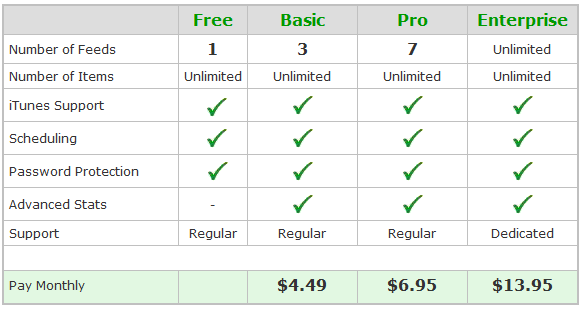
To keep the service free of any interruptions beginning July 1, 2010, we have put in place for you a system, using which you can subscribe in advance to the package that suits your needs best starting right now! However, you will start getting billed for your package only from July 1, 2010 and not before that. Moreover, you can still continue to use the unlimited version of FeedManager without any difference in service until July 1, 2010 on which date your account will be automatically converted to the package you opted for.
We highly recommend you to subscribe to the package that suits your needs best as early as possible to avoid any interruptions in service when the Freemium model would take effect on July 1, 2010. Please follow the below give instructions to subscribe:
1. Login to your RapidFeeds account
2. Go to the Billing tab
3. Select your package and billing cycle
4. Subscribe via PayPal
5. You are done!
Important: Please not that the FeedManager accounts of all the users who did not susbscibe to a package as of July 1, 2010 will be automatically converted to the “FeedManager Free” package. This would mean that all the feeds in your account, except the oldest one will be automatically disabled and you’ll not be able to use them or execute any functions like edit, add item, update etc. on them. Also, all the advanced features which are not part of the “FeedManager Free” package will be automatically disabled for your active feed as well. You’ll however have an option to go back and upgrade your account to any of the paid packages and your feeds and the advanced features will be restored accordingly.
Please feel free to write to us at support@rapidfeeds.com if you have any questions in this regard and we shall get back to you as soon as possible.